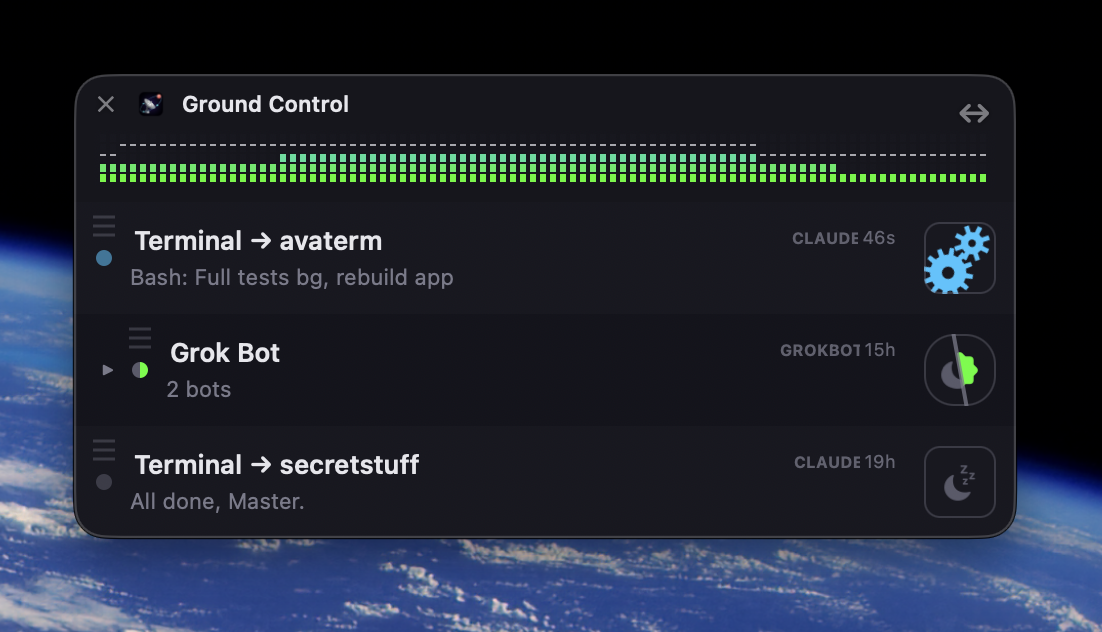
A handful of terminals, each running something, scattered across more than one Desktop. Ground Control floats above all of them — see an update, tap a row, jump to that agent.

Ground Control.
“Mission control for every agent you're running. AND jump directly to it!”
A menu-bar app for anyone running more than one AI agent at once.
Every session gets a row — its name, what it's doing right now, and a dot that turns red the moment it is blocked and needs you.
Click the row and the terminal tab that owns it comes to the front. No hunting through windows.
Built for the AI coding CLIs you already run on your Mac — Claude Code and Grok CLI today.
And it is skinnable, WinAmp-style. Swap the entire look in seconds. A status panel you stare at all day should be a thing you actually want on screen.
“I waste time checking if my Session or Agent is done or waiting for me”
The cost was never the waiting. It was the checking.
You start an agent and go somewhere else — email, Slack, a review, a question from the desk behind you. That is the whole point of starting it. The work is supposed to happen while you are not watching.
Then it goes wrong in one of two directions, and they point away from each other.
An agent sits blocked for twenty minutes, waiting on a one-word answer you would have given instantly.
You shred the focus you switched away to protect — over and over, mostly to find nothing.
Neither is a discipline problem. You cannot remember what you were never shown, and the only way to find out is to stop what you are doing and go look.
So the fix is not a faster check. It is a free one — a glance instead of a context switch.
Key original features
Every agent, one panel
A live row per session — Claude Code and Grok CLI — with what it's doing right now and a red dot the moment it needs you.
One click to the terminal
Jumps straight to the exact tab or pane that owns the session — whichever terminal or editor you happen to be running it in.
Skinnable
Drop-in theme folders, WinAmp-style — swap the whole panel's look without touching a line of Swift.
You miss notifications.
Every agent provider is racing to build its own remote control, its own multi-device relay.
- The bottleneck moved to the reviewer.
- The reviewer is you, and you are in a meeting.
Ground Control optimizes the one Mac you are already sitting at.
Fun is a feature
Ground Control is a serious monitor for production coding agents. It can be YOUR jewelled unicorn, if you want.
It has a face
 THAT REQUESTS YOUR PRESENCE
Every session gets an avatar, and the avatar has moods.
- Nothing happening — asleep, with little z's
- Working — working
- Finished — a thumbs up
- Needs you! — attention seeking, on purpose
The design brief for that last one: you should notice it from across the room without reading anything. And it stays lit until your click actually lands somewhere — silencing an alarm nobody attended to is the one thing a monitor must not do.
It has your billboard
Across the title strip, a little dot-matrix display — the kind that lived on the front of a 90s hi-fi. When nothing needs you, it scrolls.
- Bad developer jokes
- The house name
- Words pinched from your own agents — file names, tool names, whatever today is full of
A theme brings its own vocabulary, so a theme has a voice. The font knows capitals, digits and little else, so everything it says is short and shouty. That is most of the charm.
It has your unicorns?
WinAmp skins were the last time a mainstream utility assumed you would want to make it yours. Everything since has assumed you want it to look like everything else.
The retro pull is not nostalgia for its own sake. It is nostalgia for a period when software let you fiddle.
So this is not a bonus bolted onto a serious tool. A monitor only works if you keep it open, and you keep open what you like looking at. The skins are load-bearing.
ADDITIONAL THEMES ARE AVAILABLE NOW.
THE SIGN, RECORDED RUNNING. ANALYSER EITHER SIDE, THE HOUSE NAME GOING PAST IN THE MIDDLE.
A guided brief for your image model
Themes are plain folders — some images and a JSON file. Save the file and the panel re-skins instantly. Let the app walk you through building one.
- Answer a handful of questions — whether you have a reference picture, the character, what each state is doing, the drawing style. Not the colours: those follow a fixed rule, so the panel always reads at a glance.
- It turns that into a brief and comes back with the four avatar states drawn as stills. Expect a couple of rounds of notes — that back-and-forth is the tool working, not failing.
- Only once you sign off does it price and animate. An optional pass adds decorations pinned to the panel's corners.
- It builds the folder alongside all of this — wired up and waiting for the finished art.
A nine-grid frame, and an easier way in
A theme starts from a nine-grid frame — the picture cut into a three-by-three. The four corners hold their size, the four edges stretch one way, the middle fills the rest. It is the trick behind every resizable window chrome, and the brief walks the model through drawing to it. Most people, or the model working for them, handle the default fine — background transparency and all, like this.
The easier way, if you want it: hand over one picture and let the whole thing scale to fit. Any proportions — the panel takes your picture's shape and the rows scroll inside it. Nothing to measure. A whole theme in an afternoon with no idea how any of it works.
It does not know how to draw. It knows what breaks.
The brief it writes is long. Every file, every size, each state and what it has to communicate, and the drawing rules for whichever route you picked.
Animation has two routes, and it tells you the trade. Frame-by-frame is cheap and jitters a little — right for a small detail, a blink or a glint. Full video holds the subject steady and costs tokens — right for a whole character or object. Either way, nothing animates until you have signed off on it as a still, so a wrong idea costs a picture and not a movie.
Those rules are not style advice. One animation came back with frames varying seventeen pixels in height, which on screen read as the panel resizing while it played — so the brief now says lock the silhouette, and never draw a frame from the previous one, because that drifts. Another grew heavier as it went and then snapped back at the wrap — so it says close the loop. At avatar size an expression is invisible, so a state has to be carried by colour and shape.
Try this in...
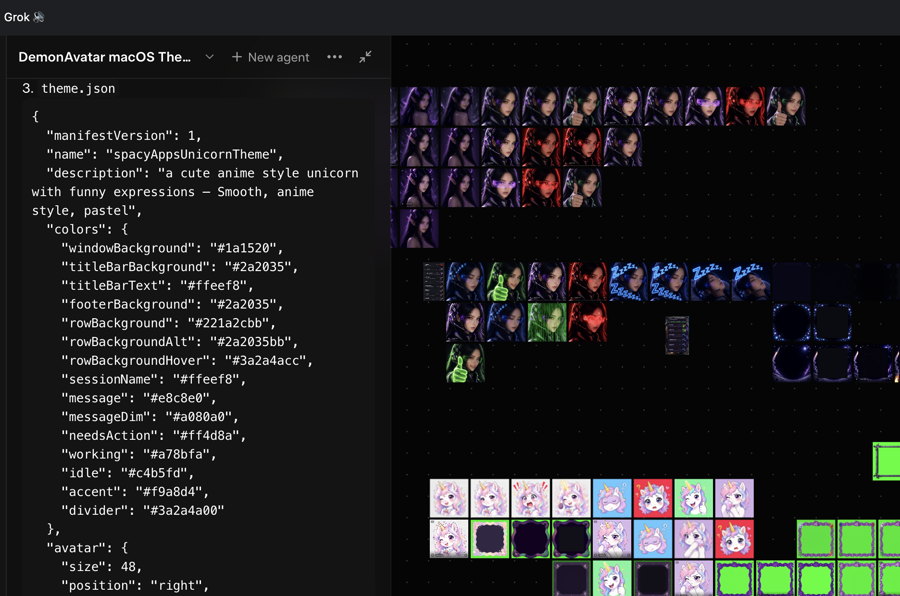
This one was made with Grok Imagine, a product of xAI — one of many models the brief works with. No affiliation.
Corner decorations
Beyond the frame and the avatars, the four corners are yours to fill — a still, an APNG, a short video, or a run of them in sequence. Pin something to each and Ground Control takes on a life of its own: a still in one corner, animation turning in the others. The corners run independently, so a static piece sits happily beside animated ones. Animations play when there's something working. The same brief that drew your avatars generates these too, and the app helps you write one for your own.
Showcase Theme: Who is Nami Star?
All of this, all together, is your personal Ground Control. Let GC help you enjoy your journey with AI.
Out of the hangar
Ground Control is public — v0.9.0, free and open source under AGPL-3.0, no account and no telemetry. macOS 13 or later, Apple Silicon and Intel: a 17MB dmg, or a 15MB zip if you'd rather not mount a disk image.
Signed with a Developer ID and notarised, so it opens with an ordinary double-click — though macOS still asks if you're sure the first time, the way it does for anything downloaded.
The artwork is a separate thing: themes are not derivative works of the program, so they carry their own licence. That split is what lets the app be free forever while a theme is something you can buy — and it means nothing is held back from the free version. The app is whole.
Research note: We proved we could type into your terminal. Then decided never to.
The question was whether Ground Control could answer an agent for you, from your phone. Approve or deny is the easy half — clean, no tricks needed.
But approve and deny are not what you need to send. You need words: use Postgres, not SQLite. The only route to words was scripting the terminal directly. That was tested, deliberately, to find out whether it could be done. It can.
Which is exactly where it stops. A yes tapped on a lock screen is not the same yes — you cannot see the working directory, or the diff, or what the last three approvals already unlocked. And approvals chain: each one clears the way for the next.
✦ No relay was ever built. Anything that can type into your terminal is a remote execution capability, and putting a relay in that path would have turned one compromised server into every Mac connected to it. Some of that could be mitigated. None of it belongs in an app whose whole job is to tell you something needs you.
It would have been the easiest thing here to sell.
Finding out you can do something is not the same as finding a reason to.